Django Request-Response Cycle
1. Introduction
Django is a popular Python web framework used to build secure, scalable, and maintainable web applications. It follows the Model-View-Template (MVT) architectural pattern.
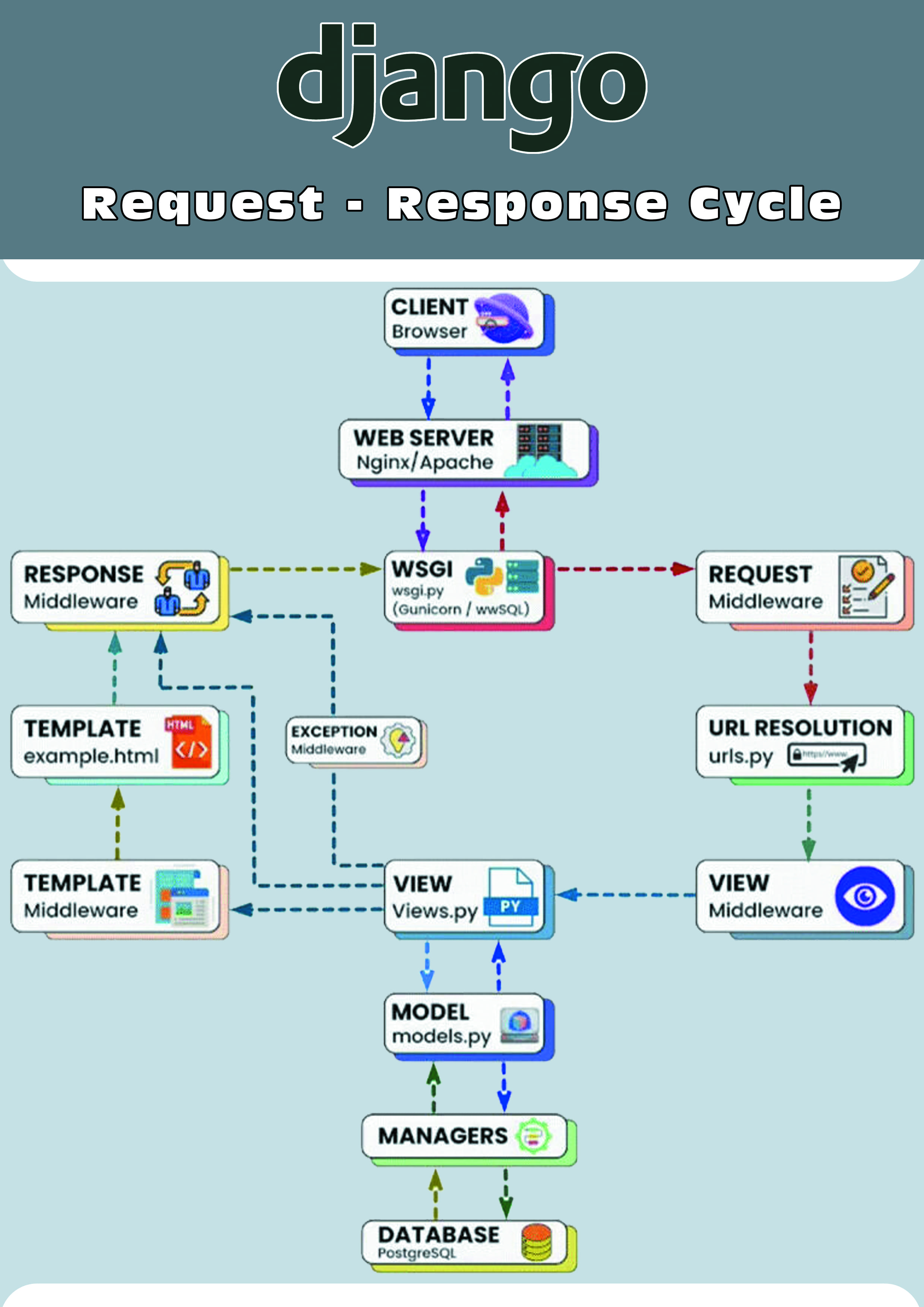
One of the most important concepts in Django is the Request-Response Cycle. It describes how a request from a user travels through different components of a Django application and how the final response is returned to the user.
The basic flow is:
Client
   ↓
Web Server
   ↓
WSGI / ASGI
   ↓
Middleware
   ↓
URL Resolution
   ↓
View
   ↓
Model / Database
   ↓
Template
   ↓
Response
   ↓
Client
Understanding this cycle helps developers understand how Django processes web requests.
2. Client Sends a Request
The process begins when a user interacts with a website through a browser.
For example, a user may enter:
https://example.com/products/The browser sends an HTTP request to the server.
The request may contain information such as:
URL
HTTP method
Headers
Cookies
Query parameters
Form data
Request body
Example:
GET /products/The request is then sent to the web server.
3. Web Server
The web server receives the request from the client.
Common web servers used with Django include:
Nginx
Apache
The web server is responsible for handling incoming connections and forwarding the request to the Django application.
For production deployments, Django commonly runs behind a web server and an application server.
Example:
Browser
   ↓
Nginx
   ↓
Django Application
4. WSGI / ASGI
Django applications communicate with web servers through an application interface.
Two commonly used interfaces are:
WSGI – Web Server Gateway Interface
ASGI – Asynchronous Server Gateway Interface
WSGI is commonly used for traditional synchronous Django applications.
ASGI supports asynchronous applications and features such as WebSockets and asynchronous request handling.
For example:
Web Server
     ↓
WSGI / ASGI
     ↓
Django
The application server may use software such as Gunicorn or another compatible server.
5. Request Middleware
After entering Django, the request passes through the configured middleware.
Middleware is a layer that can process requests before they reach the view and responses before they are returned to the client.
Middleware can be used for:
Authentication
Session management
Security
CSRF protection
Logging
Request processing
Response processing
Example:
Request
   ↓
Middleware 1
   ↓
Middleware 2
   ↓
Middleware 3
   ↓
View
Middleware can also stop a request early and return a response without reaching the view.
6. URL Resolution
Django then determines which view should handle the requested URL.
URL patterns are generally defined in a urls.py file.
For example:
from django.urls import path
from . import views

urlpatterns = [
    path("products/", views.products),
]
If the user requests:
/products/Django matches the URL with the appropriate URL pattern.
The corresponding view function or class is then called.
7. View
The View contains the main application logic for processing a request.
A view receives the request and performs the required operations.
For example:
from django.http import HttpResponse

def home(request):
    return HttpResponse("Welcome to my website")
A view can:
Read request information
Validate user input
Query the database
Call other services
Process business logic
Render a template
Return a response
The view acts as an important connection between the user's request, models, templates, and the final response.
8. Model
The Model represents the application's data and defines how that data is stored in the database.
Django provides an Object-Relational Mapping (ORM) system that allows developers to interact with databases using Python objects.
Example:
from django.db import models

class Product(models.Model):
    name = models.CharField(max_length=100)
    price = models.DecimalField(max_digits=10, decimal_places=2)
The model describes the structure of the product data.
A view can use the model to retrieve or modify information.
Example:
products = Product.objects.all()9. Database
The Django model communicates with the database through Django's ORM.
Django supports several databases, including:
PostgreSQL
MySQL
SQLite
Oracle
For example:
View
 ↓
Model
 ↓
Django ORM
 ↓
Database
The database may return records such as:
Product
-----------------
Laptop     $900
Phone      $500
Keyboard   $50
The returned data is then passed back to the application.
10. Managers
Django models use Managers to provide database query operations.
The default manager is commonly accessed through:
Model.objectsFor example:
products = Product.objects.all()Other common operations include:
Product.objects.get(id=1)

Product.objects.filter(price__gt=100)

Product.objects.create(
    name="Laptop",
    price=900
)
The manager works with Django's ORM to communicate with the database.
11. Template
After the view obtains the required data, it may pass that data to a Django template.
Templates are used to generate HTML dynamically.
Example:
<h1>Products</h1>

{% for product in products %}
    <p>{{ product.name }} - ${{ product.price }}</p>
{% endfor %}
The view can render the template like this:
from django.shortcuts import render

def products(request):
    products = Product.objects.all()

    return render(
        request,
        "products.html",
        {"products": products}
    )
Django combines the template with the supplied data to generate the final HTML.
12. Response Middleware
After the view creates a response, the response travels back through the middleware layers.
Middleware can modify or inspect the response before it is sent to the client.
The flow is approximately:
View
 ↓
Response Middleware
 ↓
Web Server
 ↓
Client
For example, middleware may add security headers or perform other response-related processing.
13. HTTP Response
Django eventually generates an HTTP response.
A response may contain:
Status code
Headers
HTML
JSON
Files
Redirect information
Example:
HTTP/1.1 200 OK

<html>
    <body>
        <h1>Products</h1>
    </body>
</html>
The response is sent through the web server back to the user's browser.
14. Client Receives the Response
The browser receives the response and displays the result to the user.
The complete cycle can be represented as:
Client / Browser
       ↓
Web Server
       ↓
WSGI / ASGI
       ↓
Request Middleware
       ↓
URL Resolution
       ↓
View
       ↓
Model
       ↓
Database
       ↓
Model
       ↓
View
       ↓
Template
       ↓
Response Middleware
       ↓
Web Server
       ↓
Client / Browser
15. Django MVT Architecture
Django follows the Model-View-Template (MVT) architecture.
Model
The Model manages application data and database interactions.
Model → DatabaseView
The View handles the request and contains application logic.
Request → View → ProcessingTemplate
The Template controls how the final information is presented to the user.
Data + Template → HTMLTogether, these components create the MVT architecture.
16. Complete Example
Consider an online shopping application.
A user visits:
/products/The process can be:
Step 1: Browser
The browser sends a GET request.
GET /products/Step 2: Web Server
Nginx receives the request and forwards it to Django.
Step 3: Middleware
Django processes the request through configured middleware.
Step 4: URL Resolution
Django finds the URL pattern:
path("products/", views.products)Step 5: View
The products view is executed.
def products(request):
    products = Product.objects.all()
    return render(
        request,
        "products.html",
        {"products": products}
    )
Step 6: Model and Database
Django's ORM retrieves product records from the database.
Step 7: Template
The product information is inserted into products.html.
Step 8: Response
Django generates an HTTP response containing the HTML.
Step 9: Browser
The browser receives the HTML and displays the product page.
17. Request vs Response
Request
A request is sent from the client to the server.
It may contain:
URL
Method
Headers
Cookies
Query parameters
Form data
Request body
Common HTTP methods include:
GET
POST
PUT
PATCH
DELETE
Response
A response is sent from the server back to the client.
It may contain:
Status code
Headers
HTML
JSON
Redirects
Files
Common HTTP status codes include:
200 → OK
201 → Created
301 → Redirect
400 → Bad Request
401 → Unauthorized
403 → Forbidden
404 → Not Found
500 → Server Error
18. Advantages of Django's Architecture
Django's request-response architecture provides several advantages:
Clear separation of responsibilities
Reusable application components
Built-in security features
Powerful ORM
Middleware support
Template system
URL routing
Authentication support
Easy database integration
Suitable for scalable applications
This architecture makes Django suitable for both small projects and large web applications.
19. Summary
The Django Request-Response Cycle explains how a web request travels through a Django application.
The basic flow is:
Client
   ↓
Web Server
   ↓
WSGI / ASGI
   ↓
Middleware
   ↓
URL Resolution
   ↓
View
   ↓
Model
   ↓
Database
   ↓
View
   ↓
Template
   ↓
Response Middleware
   ↓
Web Server
   ↓
Client
The URL resolver determines which view should handle the request. The view processes the request and can interact with the model and database. The retrieved data can then be passed to a template, which generates the final HTML response.
Django's Model-View-Template (MVT) architecture provides a structured way to separate data management, application logic, and presentation.
Understanding the Django request-response cycle is essential for anyone learning Django because it explains what happens behind the scenes whenever a user opens a page, submits a form, accesses an API, or interacts with a Django-powered web application.