
YOLO Fish Detection and Counting Using Python: Build a Real-Time Fish Monitoring System
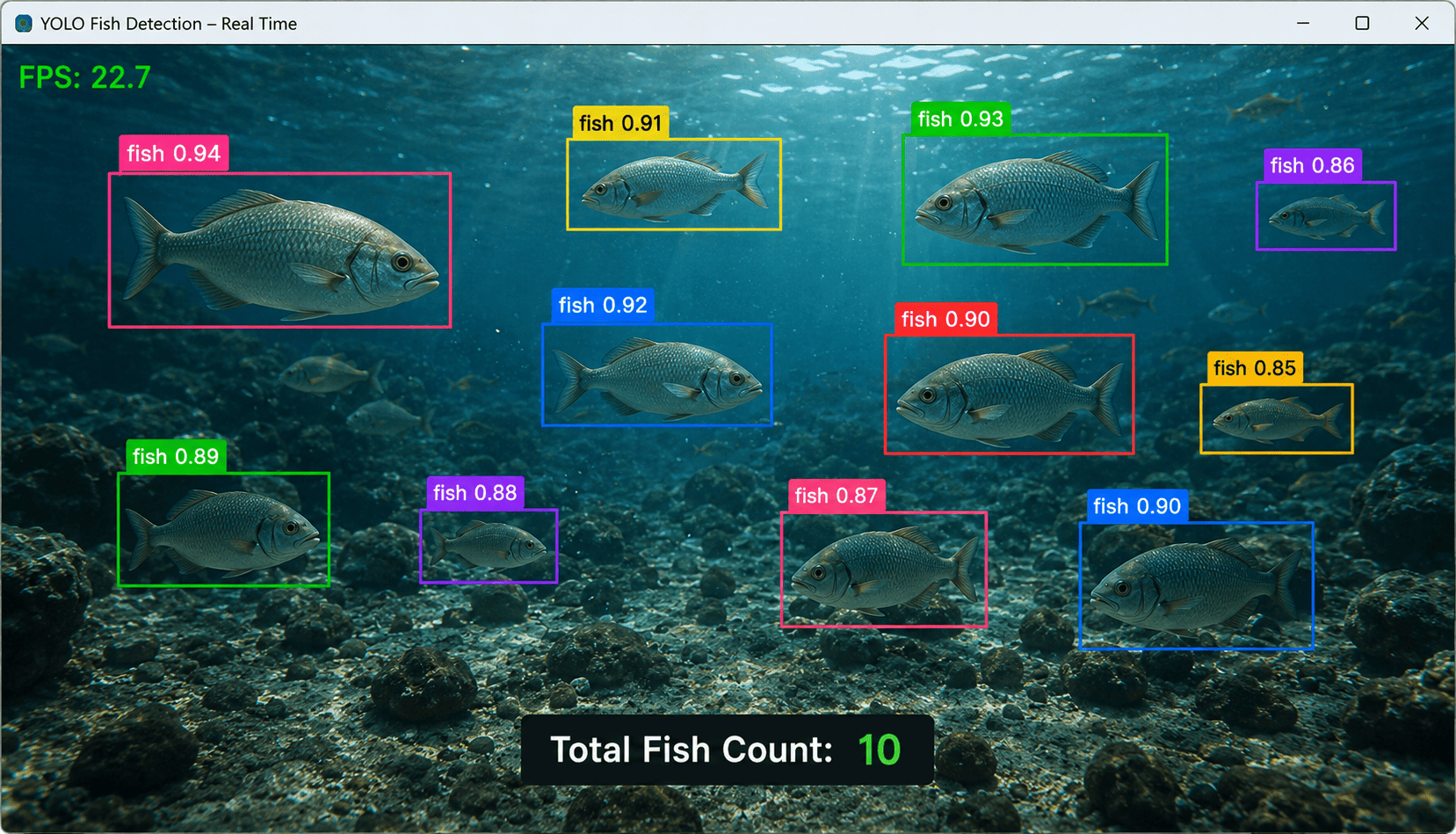
Fish detection and counting is an interesting application of computer vision that can be used to automatically identify and count fish in images and videos.
Traditional fish counting often requires people to manually inspect underwater footage or count fish in tanks, ponds, rivers, and aquaculture farms. This can be time-consuming, especially when there are hundreds or thousands of fish.
With YOLO object detection and object tracking, developers can build an automated system that detects fish, assigns tracking IDs, and counts them as they move through a camera view.
In this tutorial, we will build a Fish Detection and Counting System using Python, YOLO, OpenCV, and object tracking.
We will cover:
Fish detection from images
Fish detection from videos
Real-time webcam detection
Fish counting
Object tracking
Line-crossing counting
Custom YOLO training
Fish monitoring applications
Model evaluation and accuracy improvements
What Is Fish Detection?
Fish detection is the process of using computer vision to identify fish in images or video frames.
For example, an underwater camera may capture an image containing several fish:
Fish 1
Fish 2
Fish 3
Fish 4
Fish 5
A YOLO model can identify each fish and draw a bounding box around it.
The detection result may look like:
Fish → 0.94 confidence
Fish → 0.91 confidence
Fish → 0.89 confidence
Fish → 0.87 confidence
The confidence score represents how confident the model is about the prediction.
What Is Fish Counting?
Fish counting goes one step further.
Instead of simply detecting fish, the application determines how many fish are present or how many fish pass through a specific area.
For example:
Current Fish: 24
Or:
Fish Entered: 120
Fish Exited: 85
Fish counting can be useful in:
Aquaculture
Fish farms
Aquarium monitoring
Marine research
Fisheries research
Underwater surveys
Wildlife monitoring
Why Use YOLO?
YOLO is designed for real-time object detection.
For every detected fish, it can provide:
Class name
Bounding box
Confidence score
For example:
Class: fish
Confidence: 0.93

Bounding Box:
x1 = 120
y1 = 80
x2 = 280
y2 = 250
YOLO can process individual images as well as continuous video frames.
However, detection alone is not enough for reliable video counting.
Why Tracking Is Important
Imagine one fish swimming across a camera.
The camera captures:
Frame 1 → Fish detected
Frame 2 → Fish detected
Frame 3 → Fish detected
Frame 4 → Fish detected
Frame 5 → Fish detected
If we count every detection:
Fish Count = 5
But there is actually only one fish.
Tracking solves this problem by assigning an ID:
Frame 1 → Fish ID 1
Frame 2 → Fish ID 1
Frame 3 → Fish ID 1
Frame 4 → Fish ID 1
Frame 5 → Fish ID 1
The application understands that these detections belong to the same fish.
This is why YOLO + tracking is a better approach for video-based fish counting.
Technologies Used
We will use:
Python
YOLO
Ultralytics
OpenCV
Object Tracking
Install the required packages:
pip install ultralytics opencv-python
Create a requirements.txt file:
ultralytics
opencv-python
Install them with:
pip install -r requirements.txt
Project Structure
Create a project:
yolo-fish-detection/
│
├── images/
│   └── fish.jpg
│
├── videos/
│   └── fish.mp4
│
├── detect_image.py
├── detect_video.py
├── webcam.py
├── fish_count.py
├── train.py
└── requirements.txt
1. Load the YOLO Model
Create:
detect_image.py
Then:
from ultralytics import YOLO

model = YOLO("best.pt")

print("Fish detection model loaded successfully")
Here:
best.pt
should be your fish detection model.
If you have a pretrained model that already contains a suitable fish class, it can be used for initial experiments.
For reliable fish detection in a specific environment, a custom-trained model is generally recommended.
2. Detect Fish in an Image
Let's start with a simple image detection program.
from ultralytics import YOLO

model = YOLO("best.pt")

results = model("images/fish.jpg")

for result in results:
    result.show()
Run:
python detect_image.py
The model will analyze the image and display bounding boxes around detected fish.
3. Get Fish Detection Information
We can access the prediction results directly.
from ultralytics import YOLO

model = YOLO("best.pt")

results = model("images/fish.jpg")

for result in results:

    for box in result.boxes:

        class_id = int(box.cls[0])
        confidence = float(box.conf[0])

        class_name = result.names[class_id]

        print(
            f"Class: {class_name} | "
            f"Confidence: {confidence:.2f}"
        )
Example output:
Class: fish | Confidence: 0.95
Class: fish | Confidence: 0.92
Class: fish | Confidence: 0.89
4. Count Fish in an Image
If we only want to count fish in a single image, we can simply count the detections.
from ultralytics import YOLO

model = YOLO("best.pt")

results = model("images/fish.jpg")

fish_count = 0

for result in results:

    for box in result.boxes:

        class_id = int(box.cls[0])
        class_name = result.names[class_id]

        if class_name == "fish":
            fish_count += 1

print("Total Fish:", fish_count)
Example:
Total Fish: 12
This works well for individual images.
5. Add a Confidence Threshold
We can ignore detections that have low confidence.
from ultralytics import YOLO

model = YOLO("best.pt")

results = model(
    "images/fish.jpg",
    conf=0.50
)

fish_count = 0

for result in results:

    for box in result.boxes:

        confidence = float(box.conf[0])

        if confidence < 0.50:
            continue

        class_id = int(box.cls[0])
        class_name = result.names[class_id]

        if class_name == "fish":
            fish_count += 1

print("Fish:", fish_count)
You can experiment with:
0.30
0.40
0.50
0.60
0.70
The correct threshold depends on the model and application.
6. Save the Detection Result
We can save an annotated image:
from ultralytics import YOLO

model = YOLO("best.pt")

results = model("images/fish.jpg")

for result in results:

    result.save(
        filename="detected_fish.jpg"
    )

print("Detection result saved")
The output image will contain bounding boxes around detected fish.
7. Real-Time Fish Detection With Webcam
We can use OpenCV to process a live camera stream.
Create:
webcam.py
Then:
import cv2
from ultralytics import YOLO

model = YOLO("best.pt")

camera = cv2.VideoCapture(0)

while True:

    success, frame = camera.read()

    if not success:
        break

    results = model(frame)

    annotated_frame = results[0].plot()

    cv2.imshow(
        "Fish Detection",
        annotated_frame
    )

    if cv2.waitKey(1) & 0xFF == ord("q"):
        break

camera.release()
cv2.destroyAllWindows()
Run:
python webcam.py
The camera will continuously send frames to the YOLO model.
8. Display the Current Fish Count
We can count the fish detected in each frame.
import cv2
from ultralytics import YOLO

model = YOLO("best.pt")

camera = cv2.VideoCapture(0)

while True:

    success, frame = camera.read()

    if not success:
        break

    results = model(frame)

    fish_count = 0

    for result in results:

        for box in result.boxes:

            class_id = int(box.cls[0])
            class_name = result.names[class_id]

            if class_name == "fish":
                fish_count += 1

    cv2.putText(
        frame,
        f"Fish: {fish_count}",
        (30, 50),
        cv2.FONT_HERSHEY_SIMPLEX,
        1,
        (0, 255, 0),
        2
    )

    cv2.imshow(
        "Fish Counting",
        frame
    )

    if cv2.waitKey(1) & 0xFF == ord("q"):
        break

camera.release()
cv2.destroyAllWindows()
The screen could display:
Fish: 17
This represents the number of fish detected in the current frame.
9. Why Frame-by-Frame Counting Is Not Enough
Suppose one fish remains in front of the camera for 100 frames.
The model might detect:
Frame 1 → Fish
Frame 2 → Fish
Frame 3 → Fish
...
Frame 100 → Fish
If we add one to the total for every detection, we would incorrectly report:
100 Fish
when there is only one.
To count unique fish or fish crossing a particular area, we need object tracking.
10. YOLO Fish Tracking
Ultralytics provides tracking functionality.
from ultralytics import YOLO

model = YOLO("best.pt")

results = model.track(
    source="videos/fish.mp4",
    tracker="bytetrack.yaml",
    show=True
)
The tracker attempts to maintain an ID for each detected fish.
For example:
Fish ID 1
Fish ID 2
Fish ID 3
Fish ID 4
These IDs can remain associated with the fish across multiple frames.
11. Real-Time Fish Tracking
Create:
fish_count.py
Then:
import cv2
from ultralytics import YOLO

model = YOLO("best.pt")

camera = cv2.VideoCapture(0)

while True:

    success, frame = camera.read()

    if not success:
        break

    results = model.track(
        frame,
        persist=True,
        tracker="bytetrack.yaml",
        conf=0.50
    )

    annotated_frame = results[0].plot()

    cv2.imshow(
        "Fish Tracking",
        annotated_frame
    )

    if cv2.waitKey(1) & 0xFF == ord("q"):
        break

camera.release()
cv2.destroyAllWindows()
The tracking system can assign IDs to detected fish.
12. Count Unique Fish IDs
We can store tracking IDs in a Python set.
import cv2
from ultralytics import YOLO

model = YOLO("best.pt")

camera = cv2.VideoCapture(0)

unique_fish = set()

while True:

    success, frame = camera.read()

    if not success:
        break

    results = model.track(
        frame,
        persist=True,
        tracker="bytetrack.yaml",
        conf=0.50
    )

    result = results[0]

    if result.boxes.id is not None:

        track_ids = (
            result.boxes.id
            .int()
            .cpu()
            .tolist()
        )

        for track_id in track_ids:
            unique_fish.add(track_id)

    annotated_frame = result.plot()

    cv2.putText(
        annotated_frame,
        f"Unique Fish: {len(unique_fish)}",
        (30, 50),
        cv2.FONT_HERSHEY_SIMPLEX,
        1,
        (0, 255, 0),
        2
    )

    cv2.imshow(
        "Fish Counting",
        annotated_frame
    )

    if cv2.waitKey(1) & 0xFF == ord("q"):
        break

camera.release()
cv2.destroyAllWindows()
Example display:
Unique Fish: 25
This counts the tracking IDs observed during the current session.
However, in real underwater footage, tracking IDs can sometimes be lost due to occlusion, fish overlap, or poor visibility, so this should not be treated as a perfect biological census.
13. Fish Counting With a Virtual Line
A more practical counting method is to count fish when they cross a virtual line.
For example:
             Fish Movement
                  ↓
                  ↓
--------------------------------
          COUNTING LINE
--------------------------------
                  ↓
                  ↓
When a fish crosses the line:
Fish Count += 1
This can be useful for:
Fish passages
Aquarium entrances
Fish farm channels
Conveyor systems
Controlled underwater cameras
14. Create a Counting Line
Define:
LINE_Y = 300
Draw the line:
cv2.line(
    frame,
    (0, LINE_Y),
    (frame.shape[1], LINE_Y),
    (255, 0, 0),
    2
)
This creates a horizontal counting line.
15. Detect Fish Crossing the Line
First, calculate the center of each fish bounding box:
x1, y1, x2, y2 = map(
    int,
    box.xyxy[0]
)

center_x = (x1 + x2) // 2
center_y = (y1 + y2) // 2
Store the previous position:
previous_positions = {}
Then compare the previous and current positions.
If:
Previous Y < LINE_Y
and:
Current Y >= LINE_Y
the fish has crossed the line.
16. Complete Fish Line-Crossing Counter
Here is a basic implementation:
import cv2
from ultralytics import YOLO

model = YOLO("best.pt")

camera = cv2.VideoCapture(0)

LINE_Y = 300

fish_count = 0

previous_positions = {}

counted_ids = set()

while True:

    success, frame = camera.read()

    if not success:
        break

    results = model.track(
        frame,
        persist=True,
        tracker="bytetrack.yaml",
        conf=0.50
    )

    result = results[0]

    if result.boxes.id is not None:

        boxes = (
            result.boxes.xyxy
            .cpu()
            .tolist()
        )

        track_ids = (
            result.boxes.id
            .int()
            .cpu()
            .tolist()
        )

        for box, track_id in zip(
            boxes,
            track_ids
        ):

            x1, y1, x2, y2 = map(
                int,
                box
            )

            center_x = (
                x1 + x2
            ) // 2

            center_y = (
                y1 + y2
            ) // 2

            previous_y = (
                previous_positions
                .get(track_id)
            )

            if (
                previous_y is not None
                and previous_y < LINE_Y
                and center_y >= LINE_Y
                and track_id not in counted_ids
            ):

                fish_count += 1

                counted_ids.add(
                    track_id
                )

            previous_positions[
                track_id
            ] = center_y

            cv2.rectangle(
                frame,
                (x1, y1),
                (x2, y2),
                (0, 255, 0),
                2
            )

            cv2.putText(
                frame,
                f"ID: {track_id}",
                (x1, y1 - 10),
                cv2.FONT_HERSHEY_SIMPLEX,
                0.6,
                (0, 255, 0),
                2
            )

    cv2.line(
        frame,
        (0, LINE_Y),
        (frame.shape[1], LINE_Y),
        (255, 0, 0),
        2
    )

    cv2.putText(
        frame,
        f"Fish Count: {fish_count}",
        (30, 50),
        cv2.FONT_HERSHEY_SIMPLEX,
        1,
        (0, 255, 0),
        2
    )

    cv2.imshow(
        "Fish Counting",
        frame
    )

    if cv2.waitKey(1) & 0xFF == ord("q"):
        break

camera.release()
cv2.destroyAllWindows()
This example counts a tracked fish when it crosses the configured line.
17. Detect Fish in a Video
A recorded underwater video can be processed using:
from ultralytics import YOLO

model = YOLO("best.pt")

results = model.track(
    source="videos/fish.mp4",
    tracker="bytetrack.yaml",
    save=True,
    conf=0.50
)
The resulting video can contain bounding boxes and tracking IDs.
18. Create a Custom Fish Dataset
A custom dataset is usually required for reliable fish detection.
This is especially important when working with:
Specific fish species
Underwater cameras
Turbid water
Low-light environments
Coral reefs
Fish farms
Dense groups of fish
A dataset could contain classes such as:
fish
Or multiple species:
tuna
salmon
trout
tilapia
carp
For a simple fish-counting project, a single fish class is often enough.
19. Dataset Structure
A YOLO dataset can look like:
fish-dataset/
│
├── images/
│   ├── train/
│   └── val/
│
├── labels/
│   ├── train/
│   └── val/
│
└── data.yaml
Each image should have a corresponding annotation file.
For example:
images/train/fish001.jpg
labels/train/fish001.txt
20. Annotate Fish Images
Each visible fish should be annotated with a bounding box.
For example:
Image:
underwater01.jpg

Object:
fish

Bounding Box:
x1 = 120
y1 = 90
x2 = 280
y2 = 240
If an image contains 10 fish, each fish should be annotated separately.
This teaches the model to distinguish individual fish.
21. YOLO Label Format
YOLO labels use:
class_id center_x center_y width height
For example:
0 0.510 0.420 0.200 0.300
If you have only one class:
0: fish
then every fish annotation will use class ID 0.
22. Create data.yaml
Create:
data.yaml
Example:
path: ./fish-dataset

train: images/train
val: images/val

names:
  0: fish
For multiple species:
path: ./fish-dataset

train: images/train
val: images/val

names:
  0: tuna
  1: salmon
  2: trout
  3: tilapia
23. Train a Custom Fish Detection Model
Create:
train.py
Then:
from ultralytics import YOLO

model = YOLO("yolo11n.pt")

model.train(
    data="data.yaml",
    epochs=50,
    imgsz=640,
    batch=16
)
Run:
python train.py
The model will learn visual features associated with fish in your dataset.
24. Train From the Command Line
You can also use:
yolo detect train \
    data=data.yaml \
    model=yolo11n.pt \
    epochs=50 \
    imgsz=640
For larger datasets, a GPU is recommended.
25. Test the Trained Model
After training:
from ultralytics import YOLO

model = YOLO(
    "runs/detect/train/weights/best.pt"
)

results = model(
    "test_fish.jpg",
    conf=0.50
)

for result in results:
    result.show()
The trained model should identify fish in new images.
26. Fish Species Detection
The same system can be extended to identify multiple species.
For example:
0 → Tuna
1 → Salmon
2 → Trout
3 → Tilapia
Then:
from ultralytics import YOLO

model = YOLO("fish_species.pt")

results = model("fish.jpg")

for result in results:

    for box in result.boxes:

        class_id = int(box.cls[0])
        confidence = float(box.conf[0])

        species = result.names[class_id]

        print(
            f"Species: {species} | "
            f"Confidence: {confidence:.2f}"
        )
Example:
Species: Tuna | Confidence: 0.94
Species: Salmon | Confidence: 0.91
Species: Tuna | Confidence: 0.89
27. Count Fish by Species
We can combine YOLO with Python's Counter.
from collections import Counter
from ultralytics import YOLO

model = YOLO("fish_species.pt")

results = model("fish.jpg")

fish_counts = Counter()

for result in results:

    for box in result.boxes:

        class_id = int(box.cls[0])

        species = result.names[class_id]

        fish_counts[species] += 1

print(fish_counts)
Example output:
Counter({
    'tuna': 12,
    'salmon': 8,
    'trout': 5
})
This provides a species-level count.
28. Fish Detection in Aquaculture
Fish farms can use computer vision to monitor fish populations.
A camera can be placed in a controlled area and the system can estimate:
Fish Count
Fish Movement
Species
Size
Activity
More advanced models can potentially estimate fish size or detect abnormal behavior, but those tasks require specialized datasets and validation.
29. Fish Counting in Aquariums
Aquariums can use computer vision to monitor fish populations.
For example:
Total Fish: 42
Active Fish: 38
Detected Species: 5
The system could continuously analyze camera footage.
30. Marine Research
Underwater cameras can generate huge amounts of video data.
Researchers can use AI to automatically filter and analyze footage.
Instead of manually reviewing every frame, the system can identify frames containing fish.
This can significantly reduce the amount of footage requiring manual review.
31. Challenges in Fish Detection
Fish detection is often more difficult than detecting objects in normal environments.
Common challenges include:
Water Visibility
Murky or cloudy water can make fish difficult to see.
Lighting
Underwater lighting can change significantly with depth and time.
Fish Overlap
Multiple fish may overlap, making it difficult to distinguish individual animals.
Similar Appearance
Fish of the same species may look extremely similar.
Fast Movement
Fish can move quickly, making tracking more difficult.
Camera Movement
An underwater camera may move with water currents.
32. Improving Fish Detection Accuracy
Several techniques can improve performance.
Collect Diverse Images
Include:
Clear water
Murky water
Bright conditions
Dark conditions
Different depths
Different camera angles
Different fish sizes
Include Crowded Scenes
If the final application contains groups of fish, include crowded scenes in the training dataset.
Annotate Small Fish Carefully
Small fish are difficult to detect, so accurate bounding boxes are important.
Use Data Augmentation
Useful augmentation techniques include:
Rotation
Scaling
Cropping
Flipping
Brightness changes
Contrast changes
Blur
Use a Suitable Model
A larger model may improve detection accuracy but can require more computational resources.
33. Evaluate the Model
Important evaluation metrics include:
Precision
Precision =
True Positives /
(True Positives + False Positives)
Recall
Recall =
True Positives /
(True Positives + False Negatives)
IoU
IoU =
Intersection Area /
Union Area
mAP
Mean Average Precision is commonly used to evaluate object detection models.
For fish counting, you should also compare the automated count against manually verified counts on representative videos.
34. Complete Fish Detection and Counting Example
Here is a compact real-time example using YOLO tracking:
import cv2
from ultralytics import YOLO

MODEL_PATH = "best.pt"
CONFIDENCE = 0.50

model = YOLO(MODEL_PATH)

camera = cv2.VideoCapture(0)

unique_fish = set()

while True:

    success, frame = camera.read()

    if not success:
        break

    results = model.track(
        frame,
        persist=True,
        tracker="bytetrack.yaml",
        conf=CONFIDENCE
    )

    result = results[0]

    if result.boxes.id is not None:

        track_ids = (
            result.boxes.id
            .int()
            .cpu()
            .tolist()
        )

        for track_id in track_ids:
            unique_fish.add(track_id)

    annotated_frame = result.plot()

    cv2.putText(
        annotated_frame,
        f"Fish IDs Seen: {len(unique_fish)}",
        (30, 50),
        cv2.FONT_HERSHEY_SIMPLEX,
        0.8,
        (0, 255, 0),
        2
    )

    cv2.imshow(
        "YOLO Fish Detection and Counting",
        annotated_frame
    )

    if cv2.waitKey(1) & 0xFF == ord("q"):
        break

camera.release()
cv2.destroyAllWindows()
This provides a starting point for a fish tracking and counting application.
35. Complete Fish Detection Architecture
A real-world fish monitoring system could follow this architecture:
                 UNDERWATER CAMERA
                         ↓
                    VIDEO FRAME
                         ↓
                    YOLO MODEL
                         ↓
                  FISH DETECTION
                         ↓
                  OBJECT TRACKING
                         ↓
                ┌────────┴────────┐
                ↓                 ↓
           FISH COUNT          SPECIES
                ↓                 ↓
                └────────┬────────┘
                         ↓
                  DATA PROCESSING
                         ↓
                      DATABASE
                         ↓
                  ANALYTICS DASHBOARD
A dashboard could display:
=================================
       FISH MONITORING
=================================

Current Fish:       84

Fish Detected:     1,245

Species:
  Tuna:             32
  Salmon:           27
  Trout:            25

=================================
Conclusion
YOLO can be used to build powerful fish detection and counting systems using Python.
A basic model can detect fish in images, while combining YOLO with object tracking allows developers to build systems capable of following individual fish and counting them as they move through a camera view.
The basic workflow is:
Camera
   ↓
Video Frame
   ↓
YOLO Detection
   ↓
Fish Detection
   ↓
Object Tracking
   ↓
Tracking IDs
   ↓
Counting
   ↓
Database / Dashboard
For a simple image, fish counting can be performed by counting the detected bounding boxes. For video, tracking is important because the same fish appears in many consecutive frames.
For specialized applications such as aquaculture, marine research, or species identification, a custom dataset is recommended. The dataset should represent the actual underwater conditions in which the system will operate.
With YOLO + Python + OpenCV + Object Tracking, developers can create applications for automated fish monitoring, aquaculture analytics, aquarium management, marine research, and underwater computer vision.